


Sleep as Android: Smart alarm
4.617.66K Reviews
App Specs
- Version
- Varies with Device
- Updated On
- License
- Free
- Downloads
- 10,000,000+
- Developer
- Petr Nálevka (Urbandroid)
- Categories
- Lifestyle
- Platform
- Android
Screenshots
 Analysis by AppCompare
Sleep apps can make big promises, but I care most about whether an alarm fits an ordinary morning and whether the information it collects is useful rather than distracting. Sleep as Android: Smart alarm is a Lifestyle app from Petr Nálevka (Urbandroid) that combines sleep tracking with an alarm designed to wake you more gently. I find it most appealing for people who want to notice patterns in their nights, not just replace the default clock app.
Getting Started and Finding Your Way Around
First off, the setup was pretty straightforward. After downloading the app, I was greeted with a friendly tutorial that walked me through its features. It’s like having a personal sleep coach in your pocket. You can start by setting up your sleep schedule, and the app takes it from there. The interface is clean and intuitive, which scores major points in my book.
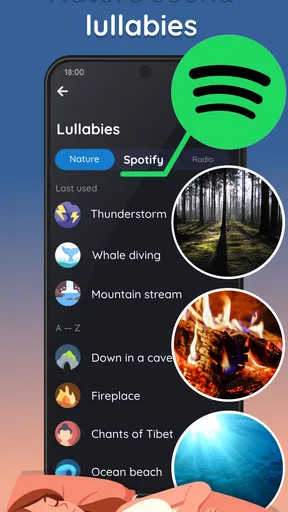
One of the first things I noticed was the variety of alarm sounds available. They range from nature sounds to more traditional alarm beeps. I opted for the gentle sound of ocean waves, hoping it would ease me into consciousness rather than jolting me awake. Spoiler alert: it worked!
Tracking Your Sleep
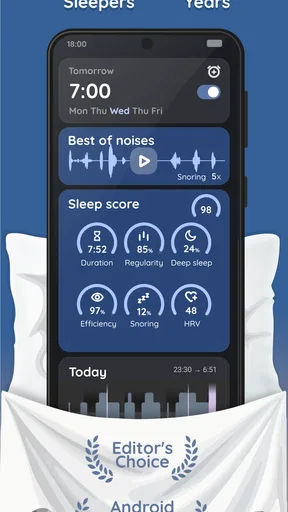
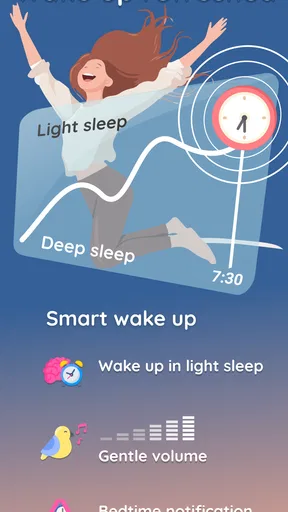
Now, the real magic of Sleep as Android lies in its ability to track your sleep. With the app running on your phone, it uses sensors to monitor your sleep cycle. This means it can wake you up during a light sleep phase, which is supposed to make waking up easier. I was skeptical, but I’ve got to admit, there’s something to it. I’ve felt noticeably less groggy in the mornings.
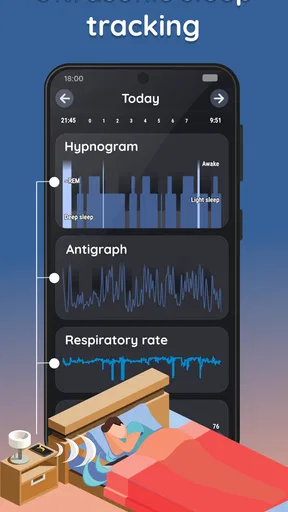
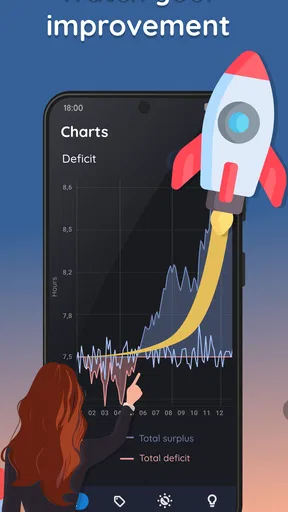
In addition to sleep tracking, the app provides detailed insights into your sleep patterns. You can view graphs of your sleep cycles, get feedback on snoring, and even monitor your breathing. It’s a sleep geek’s dream! The data is presented in a way that’s easy to understand, and I found myself looking forward to checking my sleep stats each morning.
Making the Information Useful
Charts are most helpful when I treat them as clues, not diagnoses. A single restless night might reflect a late meal, a noisy room, or an unusual bedtime; it is not proof that something is wrong. I’d look for recurring changes across several nights and compare them with my routine before adjusting anything. That habit makes the tracking feel practical rather than turning every morning into a scorecard.
A useful way to test the smart alarm is to keep the wake-up time and bedtime reasonably steady for a stretch, then note how you feel when it rings. If your schedule changes constantly, the comparison becomes less meaningful. I also wouldn’t rely on a sleep-stage estimate to make medical decisions: the app can help me observe habits, but it is not a substitute for professional advice about persistent sleep problems.
Worth Reading Before You Choose

Flipboard Shows What News Apps Must Do Beyond the Feed

Switching to Android Auto Means Rethinking Your Driving Routine

Google Calendar Makes a Crowded Week Easier to Manage

Ludo King Makes the Most of the Minutes Between Plans

Baby Panda World Brings Quick Play to Modern Phones, but Its Game Library Feels Busy

ESPN’s Live Game View Makes Following Close Games Easier
Extra Features Worth Exploring
Beyond the basics, Sleep as Android comes packed with extra features. For instance, there’s a nifty feature that integrates with smart home devices. Imagine having your bedroom lights gradually brighten as you wake up, creating a more natural waking experience. It’s like waking up to a sunrise, even if it’s pitch black outside.
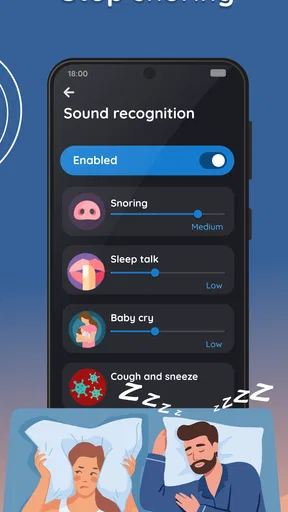
Another feature I found useful is the anti-snoring option. The app detects snoring and uses sound (like a gentle buzz) to nudge you to change position. It’s surprisingly effective and might be a game-changer for those who share a bed.
Making It Work in Different Bedrooms
Placement matters for a phone-based tracker. A position that is convenient for charging may not be the best place to capture movement or sound, and a partner’s movement or snoring can complicate what the phone picks up. I’d try a few sensible placements and compare the resulting logs before deciding that a night’s graph reflects my own sleep accurately. The anti-snoring response is also best treated as a gentle prompt, not a reliable fix for snoring or a health concern.
For a shared bedroom, it is worth thinking about the alarm as well as the tracking. A gradual nature sound may be pleasant for one person and disruptive for another, so I’d agree on a sound and volume that work for both people. If a partner has a different schedule, a separate vibrating alarm or a wearable device may be a better fit than playing audio beside the bed.
Situational Access and Everyday Routines
Picture a weekday when I need to be up for an early commute but have no reason to wake at exactly the same minute every day. I can set the alarm around the time I need to leave, choose a calmer sound, and let the app use its wake-up approach within that window. After getting up, I can check whether the night looked unusual, then leave the chart alone instead of spending the morning trying to interpret every dip. The benefit is a more considered routine, not a guarantee of feeling refreshed.
The app suits someone who keeps a phone near the bed and is willing to make it part of the night-time routine. It may be less comfortable for people who avoid screens in the bedroom, need their phone elsewhere, or do not want to think about sleep data every day. In those cases, a basic clock alarm can be simpler and less intrusive. People with hearing or sensory needs should also test whether the available alarm sound and any connected lighting suit them; a gentle sound is not automatically accessible to everyone.
How It Compares with a Basic Alarm
A standard clock app is usually the easier choice if all I need is a dependable time and a familiar tone. Sleep as Android adds a layer of sleep observation and attempts to make waking feel less abrupt, which gives it more to explore but also asks for more setup and attention. Compared with a wearable sleep tracker, using a phone can avoid wearing a device overnight, though the phone’s placement and the activity around it can affect what gets recorded. The right option depends on whether I value a simple alarm, a wearable routine, or a phone-based view of sleep patterns.
There is a trade-off in the app’s breadth: graphs and extra tools can be engaging, but they can also make a straightforward task feel involved. I’d begin with a sleep schedule and alarm sound, then add tracking or other options only if they answer a question I actually have. That keeps the experience manageable and makes it easier to tell which parts are helping.
What I Loved and What Could Be Better
Overall, I’m pretty impressed with the app. The sleep tracking is genuinely insightful, and waking up during a light sleep phase has made a positive difference. The customizable alarm sounds are a nice touch, and the ability to integrate with other devices adds a layer of convenience.
However, there are a few areas where it could improve. For one, the app can be a bit battery-draining, so you’ll want to make sure your phone is charged overnight. Also, while the snore detection feature is cool, it might not catch every snore if your phone isn’t placed just right.
That battery consideration is worth building into the routine: I would keep the phone connected to power overnight and check that the cable is positioned safely before settling in. If charging by the bed is inconvenient, the app may not be the most comfortable choice. Similarly, a person who shares a room with a light sleeper may prefer a quieter alarm method, even if that means giving up some of the app’s sound-based convenience.
Who Should Give It a Try
I’d recommend it to curious sleepers who enjoy looking for patterns, want alternatives to a harsh alarm, and are comfortable keeping a phone beside the bed. It is also a reasonable option for someone who wants to experiment with a gentle wake-up routine before buying a dedicated device. The app is free to start, with in-app purchases ranging from $0.99 to $75.00 per item, so I’d explore the basic experience first and decide whether any paid options are worthwhile for my own needs.
It has a 4.6 average from around 389,000 ratings, and it has been installed over 10 million times. Those figures suggest it has reached a broad audience, but popularity cannot tell me whether its approach fits my bedroom, schedule, or sensory preferences. It is rated for Everyone, and its long-running presence in the app category makes it a familiar choice for people seeking more than a basic alarm.
Final Thoughts
In the world of sleep apps, Sleep as Android: Smart alarm stands out as a comprehensive tool for improving your sleep quality. It’s packed with features that cater to both the casual user and the sleep enthusiast. If you’re looking to upgrade your morning routine and get some insights into your sleep habits, this app is definitely worth a try. Just remember to keep that charger handy!
My inclusive verdict is positive, with a practical caveat: the app offers useful ways to explore sleep and personalize waking, but its value depends on whether phone-based tracking, audio alarms, and bedroom charging suit your circumstances. I’d choose it for a thoughtful experiment in better mornings, not as a promise of perfect sleep. If I wanted only a reliable alarm, had a phone-free bedroom, or needed a medically dependable assessment, I’d choose a simpler clock or seek appropriate professional guidance instead.
Pros
- Comprehensive sleep tracking features
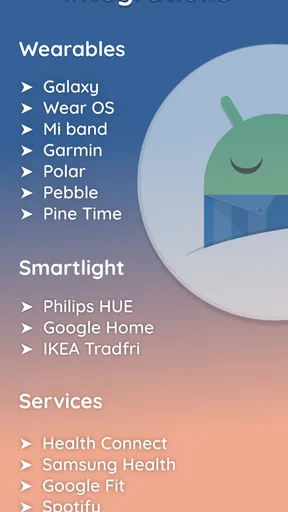
- Integrates with wearable devices
- Gentle wake-up with smart alarm
- Variety of alarm sounds and options
- Sleep insights and analytics provided
Cons
- May use excessive battery power
- Some features require in-app purchases
- Complex interface for new users
- Limited support for older devices
- Occasional syncing issues with wearables
FAQs for Sleep as Android: Smart alarm
How does Sleep as Android help improve my sleep quality?
Sleep as Android uses advanced sleep tracking technology to monitor your sleep cycles through your phone’s sensors. It provides detailed insights into your sleep patterns, including deep and REM sleep phases. The app also offers smart alarms that wake you up during light sleep, ensuring a more refreshed and energized feeling.
Is Sleep as Android compatible with wearable devices?
Yes, Sleep as Android is compatible with a variety of wearable devices, including popular fitness trackers and smartwatches. This allows for more accurate sleep tracking as the wearables can monitor your heart rate and movement more precisely, enhancing the app’s ability to analyze your sleep cycles.
What features does Sleep as Android offer for combating insomnia?
Sleep as Android includes several features to help combat insomnia, such as soothing soundscapes, binaural beats, and guided meditation. These tools are designed to relax your mind and body, making it easier to fall asleep. The app also provides sleep advice based on your unique sleep patterns and habits.
Can Sleep as Android integrate with other health apps?
Yes, Sleep as Android can integrate with other health apps like Google Fit and Samsung Health. This allows you to see a comprehensive view of your health data, combining sleep information with other wellness metrics like physical activity and nutrition, for a more holistic approach to health management.
Does Sleep as Android offer a free version, and what are the limitations?
Sleep as Android offers a free trial version, which includes most of the core features. However, some advanced functionalities, like long-term sleep tracking and additional soundscapes, are only available in the paid version. The trial allows you to test the app's basic capabilities before deciding to upgrade.


